
Download Facebook videos on iPhone
Paste a Facebook link to download an MP4, then find the video in Files on your iPhone.
Download the video in Safari
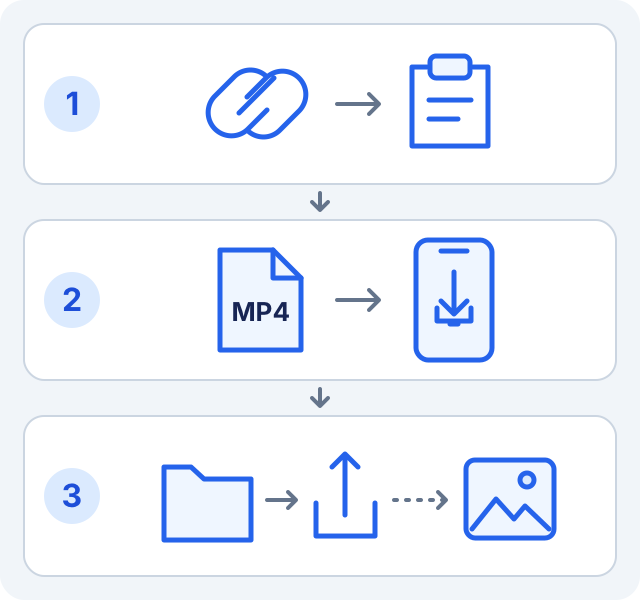
- Open the Facebook video or Reel you want to save. Copy its link from the share menu, rather than copying a profile or page link.
- Open SaveVidF in Safari, paste the link above and tap “Check link and download”. Check that the preview matches your video.
- If “Output format” appears, choose “MP4 video”, then select an available resolution. The source determines which qualities are listed.
- Tap “Download MP4” for a ready file. Otherwise, tap “Prepare file”, wait for processing, then tap “Save file”.
- Confirm the download if Safari asks and wait for it to finish. A file being ready on SaveVidF does not mean it has already downloaded to your phone.
Find the downloaded file
Open Files → Browse → iCloud Drive → Downloads. If Safari saves locally, look under On My iPhone → Downloads instead.
Check Settings → Apps → Safari → Downloads if the file is missing. You can choose iCloud Drive, On My iPhone or another folder. Safari’s download button also shows download progress.
Save a compatible video to Photos
- Open the finished MP4 in Files and check that it plays.
- Tap Share, then Save Video if that action is available. Open Photos to check the result.
- If Save Video is missing, keep the file in Files and check the format guidance below. Downloading in Safari does not automatically add the video to Photos.
Troubleshoot a download
| Problem | What to check |
|---|---|
| No Save Video option or playback fails | Turn off “Use source VP9 (no video conversion)”. Use “Download MP4” if shown, or “Prepare file” then “Save file”. The original codec may be incompatible. |
| Download stopped or is incomplete | Check Safari’s progress, your connection and free storage. Try a lower available resolution if needed. |
| The file link expired | Paste the original Facebook link again to get fresh download options. Do not reuse the expired file link. |
More download help
Frequently asked questions
Can I save an MP3 to Photos?
MP3 is audio, so keep it in Files. Choose MP4 for video. Audio availability depends on the source.
Do I need to give SaveVidF my Facebook password?
No. The tool uses accessible public links and cannot unlock private or removed content.